- Reviews
- Ratings
Reading review and rating trends across app and extension stores
A star average hides more than it shows. Learn to read rating counts, distributions and review streams across stores to find what users actually want fixed.
- Author
- Extenify Team
- Published
- Reading time
- 5 min read

On this page
The star rating is the most visible number on any store listing, and one of the least informative when read on its own. A 4.4 can describe a healthy product with thousands of happy users, or a product that was loved last year and is quietly slipping. The difference is in the details around the average: how many ratings sit behind it, how they are distributed, how they are changing, and what the reviews say.
This guide covers how to read those details for a browser extension or mobile app published to more than one store.
Start with the rating count, not the average
An average is only as trustworthy as the number of ratings behind it. A listing with a handful of ratings can swing by a full star after a single review. A listing with tens of thousands of ratings barely moves, even after a bad week.
That has two practical consequences:
- On young listings, ignore small moves in the average. Read the individual reviews instead.
- On established listings, treat any visible move as significant. If an average built on thousands of ratings drops, a lot of people changed their minds.
The rating count itself is also a signal. Steady growth in ratings means people are engaging with the listing. A sharp jump means something prompted many users to rate at once. The count going down is rarer and worth noticing: stores do remove ratings, and Extenify reports it as Ratings removed so it does not go unexplained.
Read the distribution
Two listings with the same average can have very different rating distributions:
| Distribution | What it usually means |
|---|---|
| Mostly 5 stars, a thin tail of 1 stars | Healthy product with a small group hitting a specific problem |
| Heavy 5 stars and heavy 1 stars, little in between | Polarised: works well for some users, breaks badly for others |
| Mostly 3 and 4 stars | Useful but unremarkable, users see room for improvement |
| 1 stars rising while 5 stars hold steady | A new problem affecting part of your audience |
The polarised shape is the one to take seriously. It often means the product depends on something that varies between users: a browser version, a website it integrates with, a device, a region. Fixing that specific failure can move the average more than any new feature.
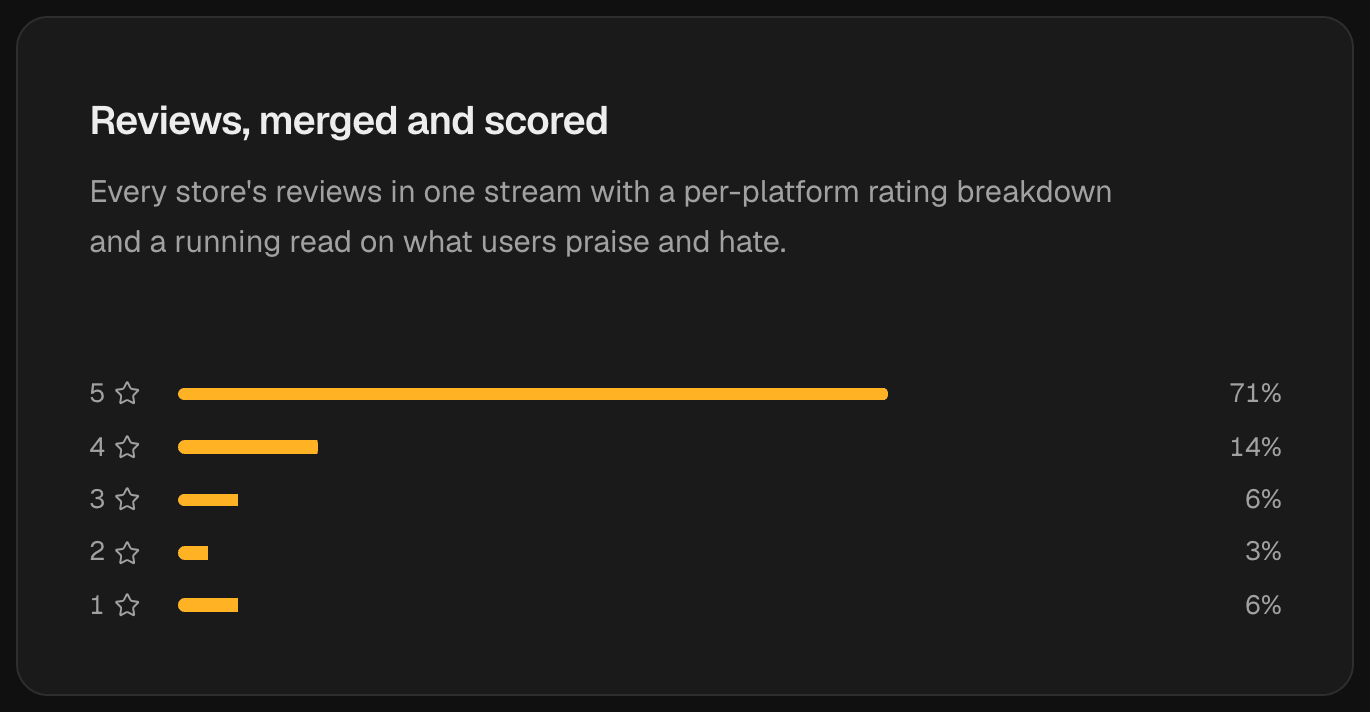
A healthy shape: mostly five stars with a thin one-star tail worth reading for a specific problem.
Compare stores against each other
For a product on several stores, the most revealing comparison is between stores, not over time. The same code getting a noticeably lower rating on one store is a strong hint that the problem is store-specific.
Common causes include:
- A different build live on that store because its review queue lagged behind.
- A browser-specific bug, for example an API that behaves differently in Firefox than in Chrome.
- A different audience, with different expectations of what the product should do.
- A stale listing whose description or screenshots promise something the current version no longer does.
In Extenify the Reviews tab puts every store's reviews in one merged stream and compares the rating distribution per platform side by side. When one store's bars look different from the others, you know where to start reading.
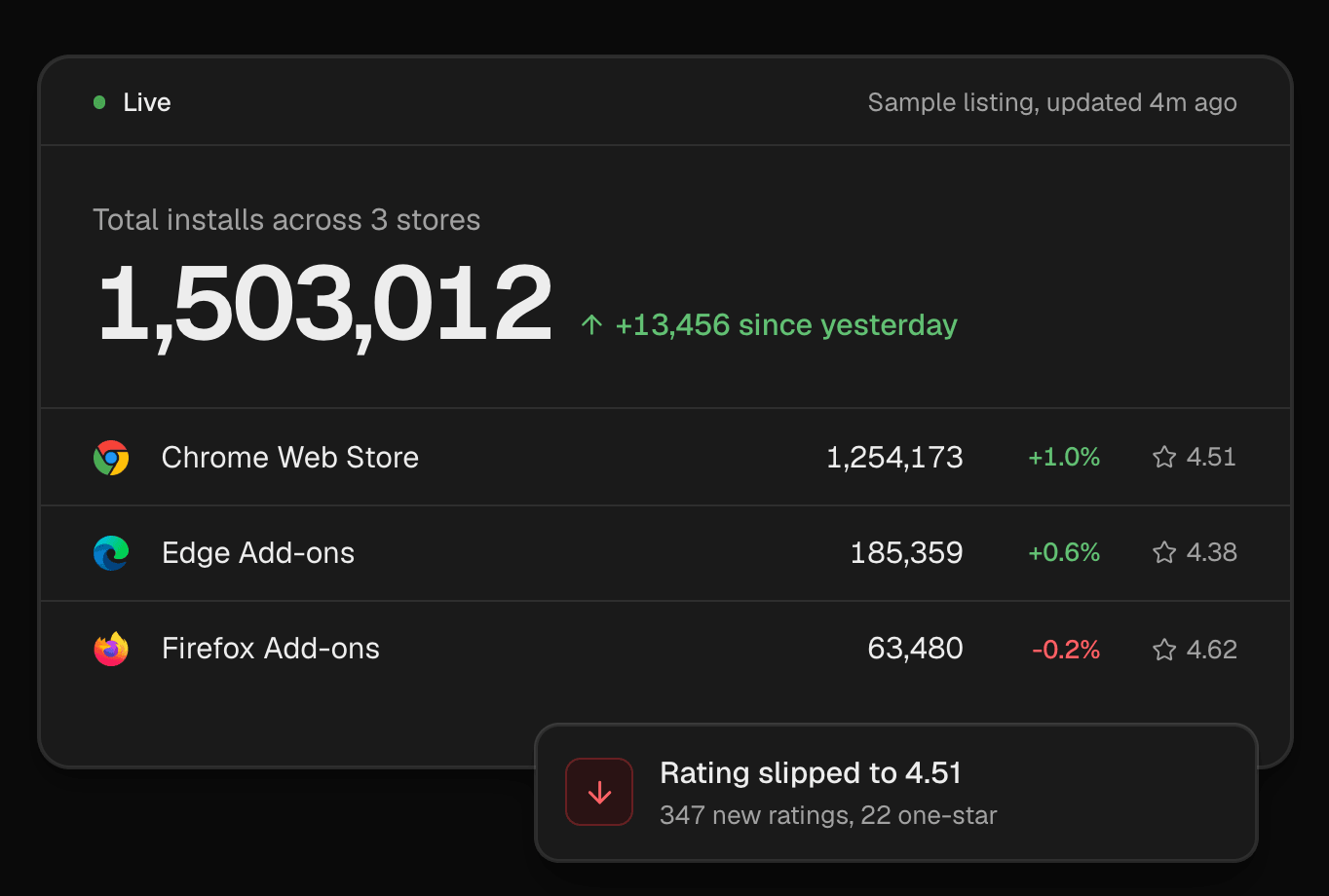
Ratings per store side by side: the Edge listing trails the other two, and a slip on Chrome is flagged with its rating count.
Read reviews for patterns, not verdicts
Individual reviews are noisy. Some users rate one star because of a feature they misunderstood, others rate five stars before really using the product. The value is in the patterns across many reviews.
Group complaints by theme
As you read, sort each negative review into a small set of themes: a broken feature, performance, a missing feature, pricing, permissions or privacy concerns, and confusion about how something works. After twenty or thirty reviews, one or two themes usually dominate.

Sorting feedback into a handful of themes turns a pile of reviews into a short list of problems. Photo: Kaboompics / Pexels
Note the timing
A theme that appears suddenly, across several reviews in a few days, almost always has a cause you can find: a release, a change on a website the extension depends on, or a browser update. A theme that has been present for months is a product decision waiting to be made.
Look at what people praise
Positive reviews are just as useful. They tell you which features people value enough to mention, which is the language to use in your listing description and which features you should protect in the next redesign.
When users describe the same problem in their own words across several stores, you are no longer guessing what to fix next.
Watch the trend, not just today
Store listings only show the current state. To see a trend you need the history, captured day by day. Once you have it, three questions cover most situations:
- Is the average moving, and is the rating count large enough for that move to matter?
- Is the change happening on every store or only one?
- Did it start near a release, a listing edit, or an outside event?
The growth view in Extenify charts rating per platform on the same timeline as users, rank and version markers, so all three questions can be answered from one chart.
Turn it into alerts
Checking reviews by hand works until it does not. A few signals are worth being told about the day they happen:
- New review lines, so low-star reviews are read while they are fresh.
- An Unusual burst of new reviews, which usually means something happened.
- Rating dropped or Rating recovered, so a slide is noticed at the start and a fix can be confirmed.
Our guide to setting up change alerts covers how to route these to the right people without adding noise.
Summary
Read the count before the average, the distribution before the count, and the reviews before any of it. Compare stores against each other, because store-specific problems are among the easiest to fix once you can see them. Keep the history, and let the daily changes come to you.
Image credits
- Cover photo: Wooden Star Rating on Blue Background by Ann H on Pexels, Pexels License.
- Sticky notes photo: Woman in Pink Long Sleeve Shirt Sticking Post Its on the Wall by Kaboompics on Pexels, Pexels License.